Pages

Sunday, January 10, 2016

CT Layouts of the Week - 9 Jan 2016

I've got another line up of fabulous kits this week, and the layouts that I did using them. When I first started digi-scrapping, I relied a lot on the layouts done by CT members for inspiration. So I hope that these layouts that I've done help to inspire you and get those creative juices flowing in some small little way. :)

Inside Pixels

Here's a layout I did using Inside Pixels' A Stronger Me kit. I think it's really cool that this kit is about documenting your exercise goals and that is something that I should start doing (it's one of my goals for 2016). For now, I used it to document our family's recent cycling adventure, where we discovered a new cycling route at East Coast Park and were rewarded with an awesome view of Singapore's skyline!

The collection also includes a set of templates, which I used to scrap our trip to watch Real Madrid! Inside Pixels also has a great soccer kit Game On: Soccer which I used for this layout.

A Stronger Me is available at The Digital Press.


Created by Jill

This week, Jill has a new release called Great Things Ahead. I love the artsy papers in this kit and the colours are just so deliciously dreamy. For the layout that I did, I tried to experiment with more blending and extracting, using the photos I took on my kayaking adventure with the seals during my New Zealand trip. I just love Jill's artsy papers, the big photo that I chose as my background just blended so seamlessly with the paper.

Great Things Ahead is available at The Digi Chick and Pickle Berry Pop.


Traci Reed

The kit from Traci this week is all about Family Game Night. It's such a fun and colorful kit, and really versatile too. I especially love the board game paper! Even though Aly is still too young to play board games, I used the kit to scrap a layout of the games that our family plays!

Family Game Night is available at Sweet Shoppe Designs.


Sunday, January 3, 2016

CT Layouts of the Week - 2 Jan 2016

Happy New Year everyone! My first blog post of 2016! I'll be trying to do a more regular weekly feature of the CT layouts that I've done for the past week.

Traci Reed Design 

First up, I'm so excited to be part of Traci Reed Design's Hawt Mama Team for 2016! I still can't quite believe that it is really happening! Have been a fan of Traci's designs since I started digi-scrapping, I love her fun and really unique designs. You can check out the rest of the 2016 Hawt Mamas here.

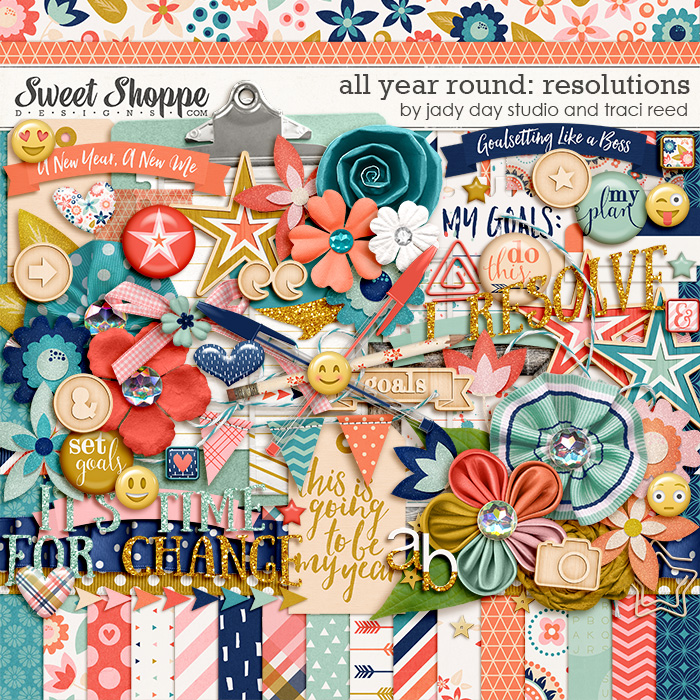
Here's the first layout that I did as a Hawt Mama, using the All Year Round: Resolutions by Traci Reed and Jady Day Studio. This kit is perfect for scrapping those goals and new year resolutions. I'm don't usually set new year resolutions, but with a kit like this, who can resist? I love the bright colours and cute journal cards which you can easily write down your goals! The kit is available at Sweet Shoppe Designs.


Created by Jill

Jill had 2 new kits this week, and both of them are gorgeous as usual.

Here's the layouts that I did using the Quiet Moments collection. I did a "Then & Now" layout for one of them. Aly and I were looking through my scrapbook album that I did for her first year and we came across this photo of her when she was barely 2 months old, taking a nap on Daddy's tummy. We thought it would be fun to recreate this photo now! Quiet Moments is available at The Digi Chick and Pickle Berry Pop.


And here's the layouts that I did for another gorgeous kit These are My Dreams for You. And what I love about Jill's kits is that you can create both traditional and more artsy layout from the same kit, as what I've done here. These are My Dreams for You can also be found at The Digi Chick and Pickle Berry Pop.


And finally, this is not a new release but some of Jill's kits will be retiring from her stores, so she's having a retiring sale which will run till January 10.

One of the kits is Freaky Deaky and here's a layout I did using this really fun kit. Check out the sale at The Digi Chick and Pickle Berry Pop.


Sunday, December 20, 2015

Layouts for the Holiday Season

Can't believe it's already December and the end of another year. This year seem particularly eventful for me and in the digi scrapping area, I'm proud that I got the chance to be on the Creative Teams of several awesome designers, and had the chance to really take this hobby to the next level.

December is the month of festivities and reflections and there are just so many wonderful holiday kits out there. Here are some that I did as part of my CT layouts. 

These two layouts are done using the It's That Time of Year Again - Fusion Bundle by Created by Jill, available at The Digi Chick and Pickleberrypop. I love the bright bold colours and how it is different from the traditional Christmas kits. 


Here's another kit by Created by Jill, Merry Little Everything. It is a mini bits kit so all the elements are minis. I tried to do a white space layout, which I don't usually do as I like to have a lot going on in my layouts. Lol. I blended the photo into the paper and I think it turned out quite nice and I'm rather happy with it. Merry Little Everything is available at The Digi Chick and Pickleberrypop too. 


The latest kit from Created by Jill is the A Year in Review pickle barrel bundle from Pickleberrypop. This kit is perfect for those year in review layouts (obviously!). The bundle includes templates and I like that the templates are also made for this purpose, 12 placeholders for 1 photo a month, just like the layout I did below. 


And of course, you can also go off-topic, like this one I did for my trip to Geneva earlier this year. There are really so many ways to use the kit.


Here's a layout I did using Inside Pixels' Twas the Night Before Christmas kit. This kit is a more traditional Christmas kit and since I actually don't have a kit like that, I was glad I had the chance to work with it. The kit is available at The Digital Press


This is a layout I did using using the Santa's Coming collab by Sunshine Inspired Designs and Chunlin Designs, part of the Santa's Stocking collab at With Love Studio.


And another layout using Sunshine Inspired Design's Winter Time collection, available at both With Love Studio and Scraps N Pieces. This kit is super pretty and the colours and just so sweet.


And for the month of December, I was very lucky to win a guest spot on Two Tiny Turtle's Creative Team! Here are the layouts I did using her kits and templates.

Using Oh My Darling template:


Using Make Your Own Path 3 template:


Using Make Your Own Path 1 template and the Holly Jolly Christmas kit:


Using the Life is Crazy template:


The kits and templates can be found at Two Tiny Turtle's store at Sweet Shoppe Designs

Well, I'm not done with scrapping for December yet, so stay tuned for more to come!

Monday, November 23, 2015

How to get started in digi scrapping

When I first came across digital scrapbooking or digi scrapping for short, I was simply amazed by how wonderful the layouts looked and couldn't believe that they were done digitally! I knew that this was something I wanted to do and I couldn't wait to get started. However, I was also overwhelmed by all the resources and different communities out there and I didn't quite know how to begin. Fortunately I have figured out my way around and am now a happy digi scrapper.

So, I thought I would share some tips on how to get started in digi scrapping, and hopefully this will help those of you who are new to this amazing craft!

First of all, what is digital scrapbooking?

Well, simply put, instead of traditional paper scrapbooking where you make layouts using actual papers and elements, digi scrapping is the use of digital scrapbooking papers and elements, such as these...


... to make digital scrapbook layouts, such as this....


... using a photo editing software.

(The layout above is created using the Behind Every Good Kid kit by Jady Day Studios.)

Next up, how to get started in digital scrapbooking?

If you are thinking that in order to get started, you'll need to start investing in software or start buying a whole lot of digi scrapping kits, well you don't have to. There are a lot of free resources on the web, and you can make use of these resources to try it out, learn the basics, and get comfortable with digi scrapping.

Here are 3 ways how you can get started.

1. Master the Basics

There are some basic techniques that you'll need to know as a digi scrapper, and the beauty of the internet age is that there are A LOT of tutorials on digi scrapping. Here are some of my favorite FREE beginner tutorials:

Digital Scrapbooking for Beginners at Scrapaneers

This is a video tutorial so it actually makes it easier for you to visualize. What I like about this tutorial is that it is systematic, it starts from the basics all the way to creating an entire layout. And what I really like about it is that it comes with a full digital scrapbook kit, some quick pages and templates FREE, so you can start to practice right away!

"Getting Started" Tutorials at Sweet Shoppe Designs

There is a whole section of beginner tutorials at the Sweet Shoppe, and they cover many techniques and topics like choosing a photo editing software, making your first layout, using templates etc. However, the tutorials are not organised in terms of levels of difficulty, so you would have to explore a bit. I would recommend starting from this introductory tutorial, and this on how to make your first layout.

Tutorials at Pixel Scrapper

This is also another source of tutorials and what I like is that they are organised into difficulty levels so you can just zoom straight to the beginner level tutorials. There are also an introduction to the photo editing software Photoshop.


2. Download a Trial Photo Editing Software

You will need a photo editing software in order to put your layout together. There are quite a number of software that digi scrappers use. Here is a good introduction and overview of the various available software. The more popular ones would be Adobe Photoshop CS and Adobe Photoshop Elements.

Most of these software would have free trials, so download them and give it try and see which one you are most comfortable with. I have only used Adobe Photoshop CS so I can't comment on the rest, but in my opinion, I would suggest going for Adobe Photoshop Elements or CS as these are full feature programs and you would have more control over the effects that you create.


3. Hunt for Freebies

Now that you have learnt some basic techniques and gotten hold of a photo editing software, it's time to practice! And to do that, you will need some supplies - digital scrapbooking papers and elements. Most of the digi scrapping stores and designers offer freebies that you can download. As mentioned earlier, if you download the beginner's tutorial at Scrapaneers, you already get a full kit free. That is already enough to get you started. At Pixel Scrapper, if you sign up for an account (you don't need to pay anything to sign up), you can get a full collab kit free too. Take your time to explore the web and various digi scrapping stores and see what goodies you can pick up.

Here are some to get you started:

Sweet Shoppe Designs
The Digi Chick
Quality Digi Scrap Freebies
Digi Scrap Freebie Finder


I hope this makes it easier for you to get started. It really isn't all that overwhelming once you get into it! It's a lot of about experimenting and having fun and finding your own personal preferences and style.

And if you get stuck again along the way, just look at the numerous galleries out there to look for inspiration. Happy scrapping!


Monday, November 16, 2015

My First Freebie: Chipboard Frames

I made a set of chipboard frames for the designer challenge on Pixel Scrapper. This is the first time I'm designing something, so there is definitely room for improvement.


You can download the frames here.

Hope you guys like it!

Friday, November 13, 2015

Scrapping frenzy over the DSD weekend!

So DSD 2015 has just ended and in the Digital Scrapping world, it's a weekend (or longer) of sales, challenges, freebies, prizes and just digi scrapping FUN!

This year, I tried to participate as much as I could. Although I didn't get to complete all the challenges that I wanted to, I did get quite a bit of scrapping done, and stocked up on my collection of dig kits with some great bargains too!

So here's some of the layouts I did.

Here's a layout using Inside Pixel's latest kit "Celebrate". The pictures are from the Hubby's birthday earlier this year when Aly and I tried to bake a cake. By the way, the cake failed miserably! It didn't rise at all! Although it still tasted good (the only saving grace)!


"Celebrate" is available at Inside Pixel's store at The Digital Press.


Here's another celebration kit and it's from Created by Jill. I love the theme of this kit, it's about celebrating the every day, and I think that is something that we don't always remember to do, when we get caught up with the hustle and bustle of work and chores.


"Celebrate Today" is available at Jill's stores at The Digi Chick and Pickle Berry Pop.


And here are some layouts that I did for DSD challenges.

For this one, it was a template challenge by Two Tiny Turtles. I used the kit Happy Day by Blagovesta Gosheva. And the best part is I clinched a spot as a guest Creative Team Member on her team for the month of December! Yay! Can't wait for it!


And sharing one more layout, it's also for a template challenge on The Digital Press. I tried more experimenting with blending and paints, using the kit "She is Fierce" by Mummyish. And I think I really liked how it turned out!


Thursday, November 5, 2015

Created by Jill: Confessions of a Shopaholic

I've got some exciting news! I've just been accepted as a Creative Team Member on Jill's team from Created by Jill! I love her artsy papers and kits and love how versatile her designs are. I can create both artsy and traditional layouts from her designs! On her team, we don't use templates, so I guess I will be challenging myself more, to think out of the box!

Well, here's my first layout that I did using Jill's designs, using the Confessions of a Shopaholic mega bundle.

This is the one and only photo I have of Aly in a Snow White dress. She begged to go into this kid's clothing store, and when I told her "no buying", I thought she would kick up a fuss like she usually does, but she actually she "ok, I just wanna try". So that was what we did and the store auntie was nice enough to let us just try and even for me to take a photo. :)


This mega bundle is available on both CBJ's The Digital Chick and Pickleberrypop stores. It's an amazing bundle with lots of embellishments, and even a free Add On. The collection is created for Digital Scrapbooking Day (or DSD as it's known in the Digiscrapbooking world) this weekend! Be sure to check it out while it's on sale!